|
 |
|
|
|
|
Home
| Download
| Purchase
| Support
| Forum
| Article
| Links
| Video Downloader DVD Copy |DVD Ripper | Blu-ray Copy | Blu-ray Ripper | Mac DVD Copy | Mac DVD Ripper | Mac Blu-ray Ripper |
| Copyright © copy 2005-2013 Ideal DVD Software, Inc. All Rights Reserved. |

 button, then choose
 to open a .flv file.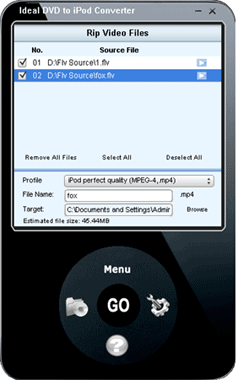
 button to preview the source flv file. If you want to clear the files in the
current file list, just click "Remove All Files" to remove them.
button to preview the source flv file. If you want to clear the files in the
current file list, just click "Remove All Files" to remove them.